
Instagram, X, Facebook, LinkedIn, TikTok, Bluesky နှင့် အခြားသော Social media network များအတွင်း အသုံးပြုသင့်တဲ့ social media image sizes 2026 အပြည့်အစုံကို ဒီ guide မှာ ဖော်ပြထားပါတယ်။ မှားယွင်းသော Dimensions တွေကို အသုံးပြုနေတဲ့ Reach, Engagement နဲ့ Brand consistency တိုလိုက်ဆုံးရှုံးနိုင်ပါတယ်။ ဒါကြောင့် Marketing 7.0 မြန်မာ strategy နဲ့ ပေါင်းစပ်ပြီး မှန်ကန်တဲ့ image sizes တွေကို အသုံးပြုဖို့ အရေးကြီးပါတယ်။
Thank you for reading this post, don't forget to subscribe!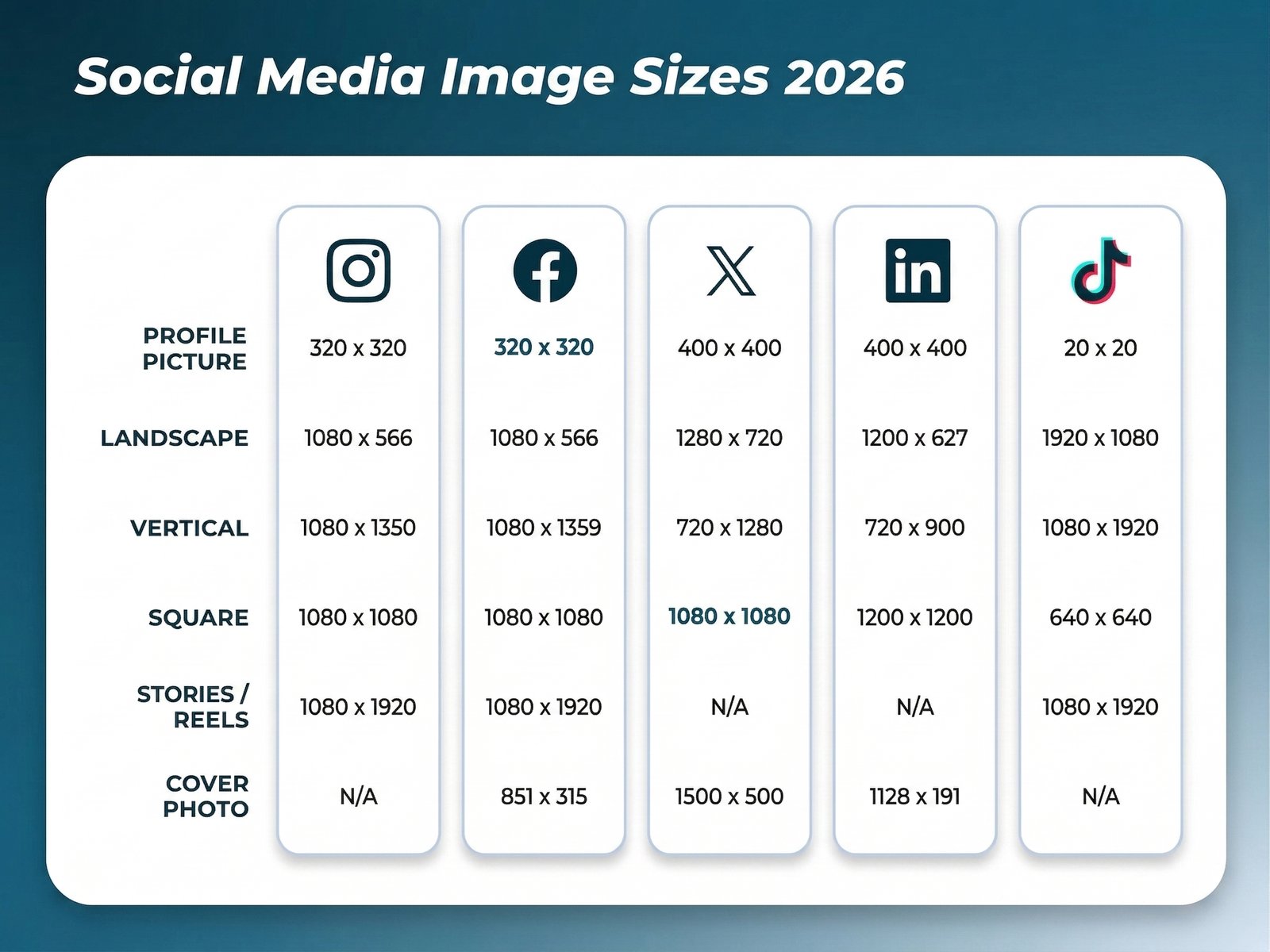
ဒီ Guide မှာ 2026 ခုနှစ်အတွင်း အဓိက Social platform တိုင်းရဲ့ လတ်တလော Image size requirements တွေကို ဖော်ပြထားပါတယ်။
Key takeaways
- Social platforms အများစုဟာ အထူးသဖြင့် feed နဲ့ full-screen formats တွေအတွင်း 1080 pixels အကျယ်ရှိတဲ့ images တွေကို အကောင်းဆုံး ဖြစ်နိုင်ပါတယ်။
- 4:5 နဲ့ 9:16 လိုမျိုး Vertical, mobile-first aspect ratios တွေကို အသုံးများသော networks အများစုဟာ square images တွေထက် ပိုမိုကောင်းမွန်ကြပါတယ်။
Quick social media image sizes
Network တစ်ခုချင်းစီတိုင်းအတွင်း အသေးစိတ်ကို ဖော်ပြမတိုင်ဆက်မှာ ဤ image မှာတော့ သင် ကူးယူပြီး မြန်မာ digital marketers အတွက် social media image sizes 2026 တွေကို တစ်ခုချင်းစီ ကြည့်ဆင်ကာ ဖော်ပြထားပါသည်။
Basic Instagram image sizes
- Profile photo: 320 x 320 px
- Landscape: 1080 x 566 px
- Vertical: 1080 x 1350 px
- Square: 1080 x 1080
- Stories and Reels: 1080 x 1920
Basic Facebook image sizes
- Profile photo: 196 x 196 px
- Landscape: 1080 x 566 px
- Vertical: 1080 x 1359 px
- Square: 1080 x 1080 px
- Stories and Reels: 1080 x 1920 px
- Cover photo: 851 x 315 px
Basic X (formerly Twitter) image sizes
- Profile photo: 400 x 400 px
- Landscape: 1280 x 720 px
- Vertical: 720 x 1280 px
- Square: 720 x 720 px
- Cover photo: 1500 x 500 px
Basic LinkedIn image sizes
- Profile photo: 400 x 400 px
- Landscape: 1200 x 627 px
- Vertical: 720 x 900 px
- Square: 1200 x 1200 px
- Cover photo size: 1128 x 191 px
Basic TikTok image sizes
- Profile photo: 20 x 20 px
- Landscape (ad): 1920 x 1080 px
- Vertical: 1080 x 1920 px
- Square (ad): 640 x 640 px
- Stories: 1080 x 1920 px
Instagram image sizes 2026
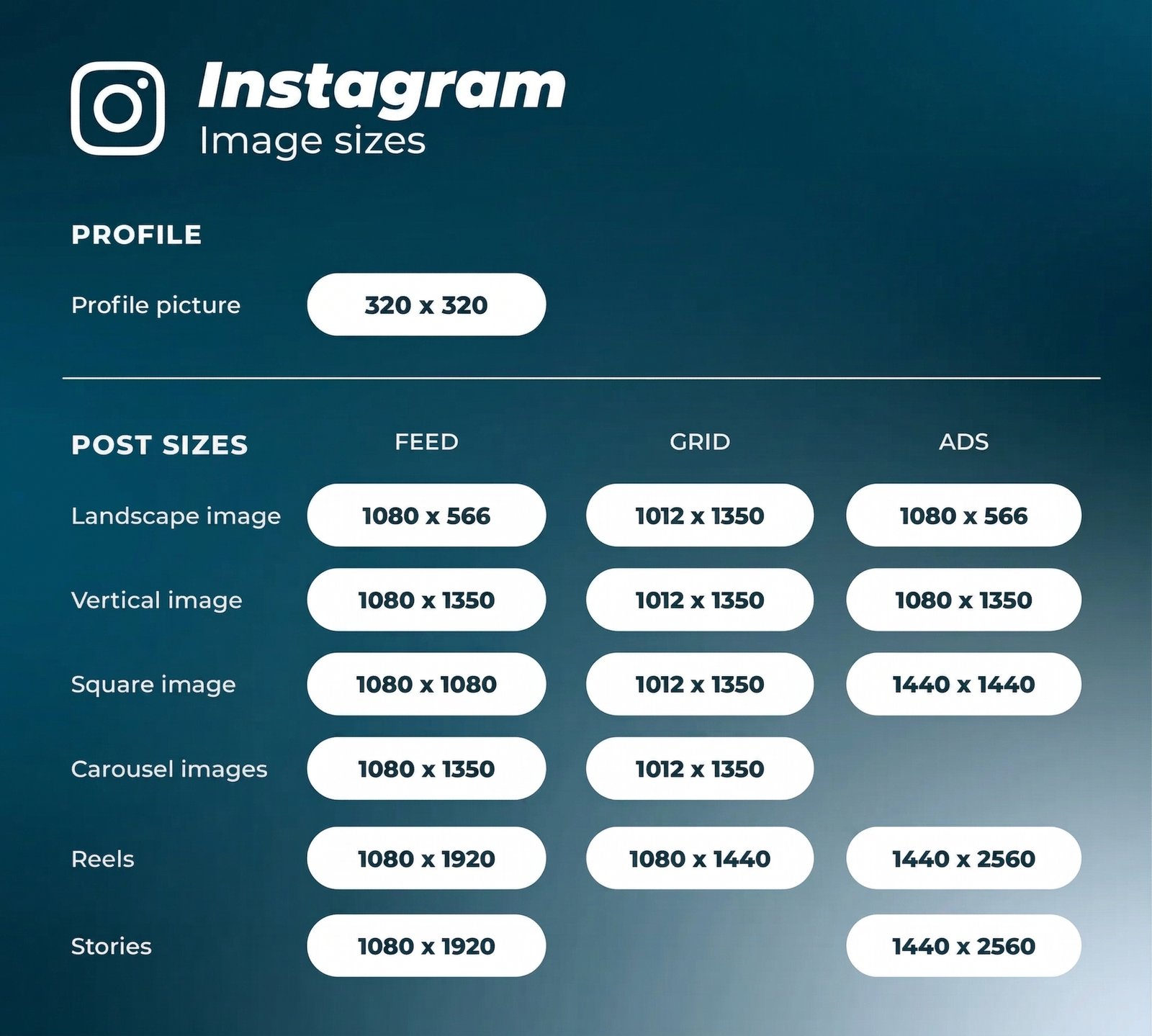
Instagram ဟာ square images တွေကတော့ horizontally နဲ့ vertically oriented images တွေကိုလည်း support ပေးပါတယ်။ သင့်ရဲ့ posts တွေမှာ ဒီ photo orientations အားလုံးကို အသုံးပြုနိုင်ပြီး Instagram feed မှာ ဒီတစ်ခုသည် ဦးစားပေးအသုံးပြုတဲ့ ဘောင်ဖြစ်ပါတယ်။ ဒါပေမဲ့ Instagram grid ပေါ်မှာ ဒီပုံတွေသည် vertical crop နဲ့ပဲ ပေါ်လာမှာ ဖြစ်ပါတယ်။
ဒါကြောင့် grid တစ်ခုချင်းစီလုံးတဲ့ ကျနော် ပြပြပြပြသပြီး image dimensions တွေကို မှန်ကန်တဲ့အောင် ထိန်းသိမ်းဖို့ ကြိုးစားသင့်ပါတယ်။ သင့်ရဲ့ images တွေ ကောင်းကောင်းမွန်မွန်ဖြစ်ဖို့ guidelines တွေကို လိုက်နာပါ။
Instagram profile picture size: 320 x 320 pixels
Instagram profile photos တွေကို 110 x 100 pixels နဲ့ ပြသတဲ့တိုင် image files တွေကို 320 x 320 pixels နဲ့ သိမ်းဆည်းထားတာ ဖြစ်ပါတယ်။ ဒါကြောင့် ကောင်းကောင်းမမြင်ရတဲ့ profile image ကို တင်ဖို့ မလိုပါ။
Dimensions တွေကို square format နဲ့ ဖြစ်နေပေမဲ့ Instagram profile photos တွေကို circle ပုံစံနဲ့ပဲ ပြသတဲ့ ဖြစ်ပါတယ်။ ဒါကြောင့် ပုံထိပ်ကွင်း အတိုင်းဆွဲထားတဲ့ image မှာ ဘေးတိုက်ငေါင်ကွာ ဖြတ်ပစ်မှာ ဖြစ်ပြီး ဘေးနားမှာ key elements တွေ မထားပါနဲ့။
Instagram post sizes:
- Landscape image: 1080 x 566 pixels (feed) / 1012 x 1350 (grid)
- Vertical image: 1080 x 1350 pixels (feed) / 1012 x 1350 (grid)
- Square image: 1080 x 1080 pixels (feed) / 1012 x 1350 (grid)
- Carousel images: 1080 x 1350 pixels (feed) / 1012 x 1350 (grid)
- Supported aspect ratios: Anywhere between 1.91:1 and 4:5 (feed) / 3:4 (grid)
- Recommended image size: Width of 1080 pixels, height between 566 and 1350 pixels
Tips:
- If you want your images to look their best on Instagram, aim to upload an image that is 1080 pixels wide.
- When you share an Instagram image that’s sized over 1080 pixels, Instagram will size it down to 1080 pixels.
- If you share a photo that has a resolution lower than 320 pixels, Instagram will size it up to 320 pixels.
- If your image is between 320 and 1080 pixels wide, Instagram will keep that photo at its original resolution, “as long as the photo’s aspect ratio is between 1.91:1 and 4:5 (a height between 566 and 1350 pixels with a width of 1080 pixels).“
- If you upload an image using a different ratio, the platform will automatically crop your photo to fit a supported ratio.
- Remember that all photos appear in vertical format on your grid.
Instagram Stories image size: 1080 x 1920 pixels
ဒါဟာ 9:16 aspect ratio ဖြစ်ပါတယ်။
“Safe area” ကတော့ 1080 x 1610 pixels ဖြစ်ပါတယ်။ ဆိုလိုတာကတော့ content တွေကို frame ရဲ့ ဒီ area အတွင်းမှာပဲ ရှိနေဖို့ ဂရုစိုက်ပါ။
Instagram Reels sizes: 1080 x 1920 pixels (feed) / 1080 x 1440 pixels (grid)
Feed aspect ratio ကတော့ 9:16 ဖြစ်ပြီး grid view ကတော့ 3:4 ဖြစ်ပါတယ်။
X (f.k.a. Twitter) image sizes 2026
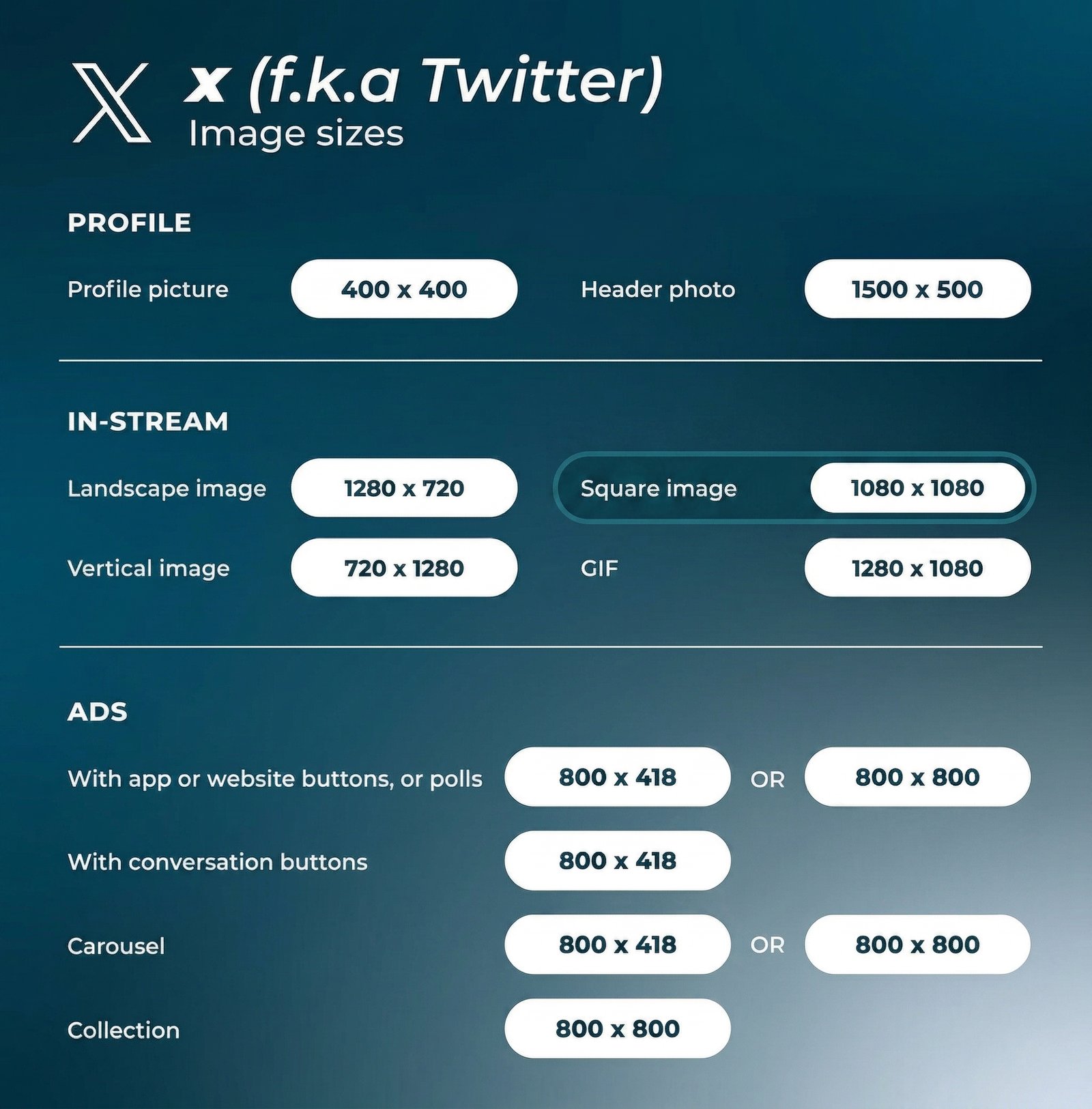
ဒါတို့ video tab အသစ်နဲ့အတူ X ဟာ platform ပေါ်မှာ multimedia experience တစ်ခုကို ဆက်လက်ပြင်ဆင်လာပါတယ်။ သင့်ရဲ့ X posts တွေမှာ images တွေ ထည့်သွင်းဖို့ ကောင်းကောင်းမမြင်ရတဲ့ ကျသင့်မသော ကျကျနန် ထားသင့်ပါတယ်။
X (Twitter) ရဲ့ profile photos မှာ image sizes: 400 x 400 pixels (recommended)
Maximum file size: 2 MB ဖြစ်ပါတယ်။
X header photo size: 1500 x 500 pixels (recommended)
Header images တွေကို ပြသတဲ့ monitor နဲ့ browser ပေါ်မှာ မတူညီပဲ ပြောင်းလဲနေနိုင်ပါတယ်။ ကောင်းကောင်းမမြင်ရတဲ့ dimensions တွေကိုသာ အသုံးပြုမိပါက အပေါ်နဲ့ အောက်ဘက်မှာ ၆၀ pixels ခန့် cropped ဖြစ်သွားနိုင်ပါတယ်။
X images sizes for in-stream photos:
- Landscape image: 1280 x 720 pixels
- Vertical image: 720 x 1280 pixels
- Square image: 1080 x 1080 pixels
- GIF: 1280 x 1080 pixels
Facebook image sizes 2026
Facebook ကတော့ အများသိသည့် ကျယ်ကျယ်ပြန့်ပြန့် platform တစ်ခုဖြစ်ပါတယ်။ ဒါကြောင့် image sizes တွေကတော့ desktop နဲ့ mobile ပေါ်မှာ မတူပဲ Facebook users တွေကို ဆွဲဆောင်နိုင်ဖို့ ကြိုးစားသင့်ပါတယ်။ ဤနေရာတွင် ဒီနေ့မှာ ကောင်းကောင်းမြင်ရတဲ့ dimensions ကို ပြနေပါတယ်။
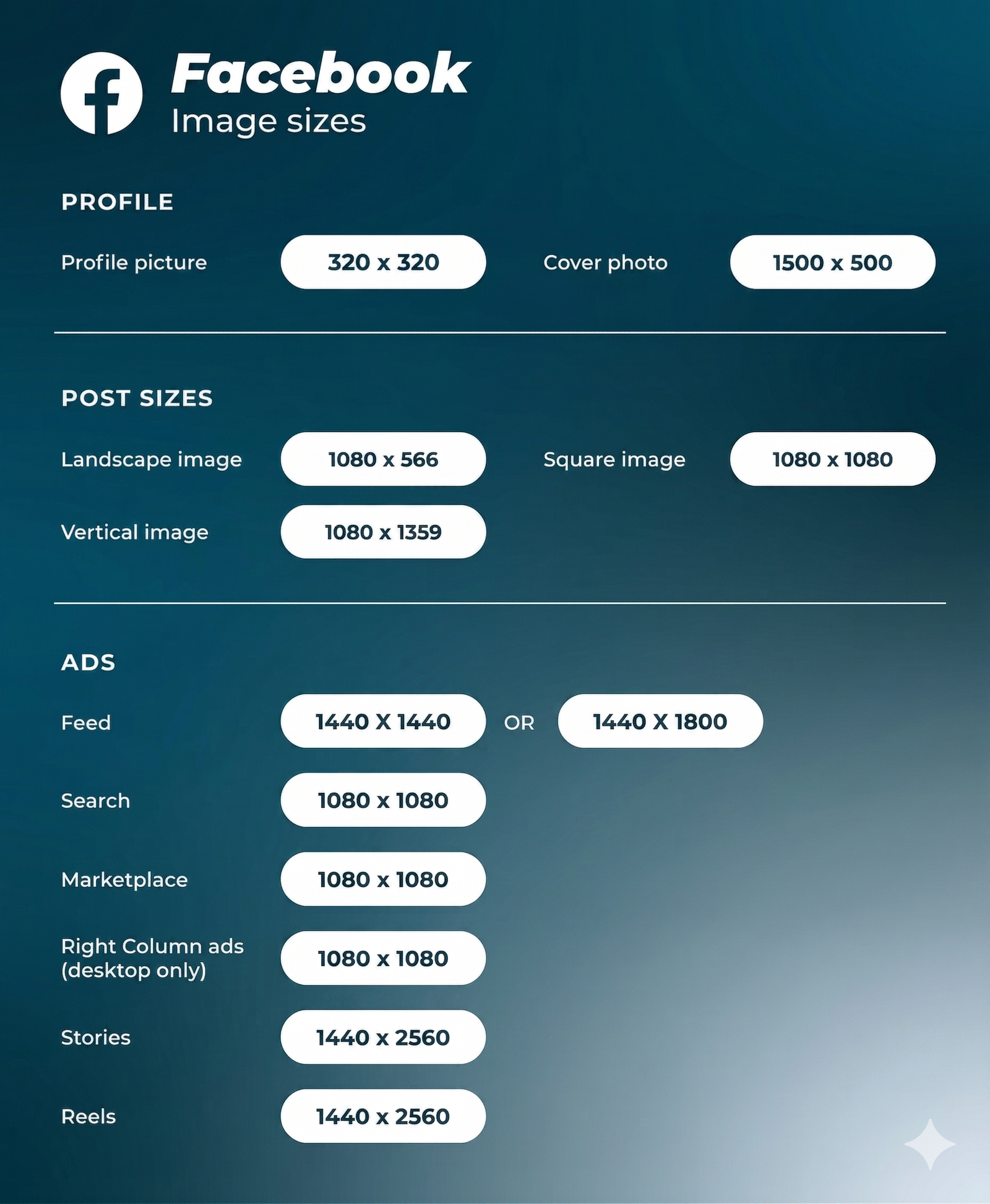
Facebook profile picture size: 320 x 320 pixels (recommended)
- Display size desktop: 176 x 176 pixels.
- Display size smartphone: 196 x 196 pixels.
Image sizes for Facebook cover photo: 851 x 315 pixels (recommended)
- Display size desktop: 820 x 312 pixels
- Display size smartphone: 640 x 360 pixels
- Minimum size: 400 x 150 pixels
- Ideal file size: Less than 100KB
Facebook Timeline photo and post sizes:
- Landscape image: 1080 x 566 pixels (1.91:1)
- Vertical image: 1080 x 1359 pixels (4:5)
- Square image: 1080 x 1080 pixels (1:1)
TikTok image sizes 2026
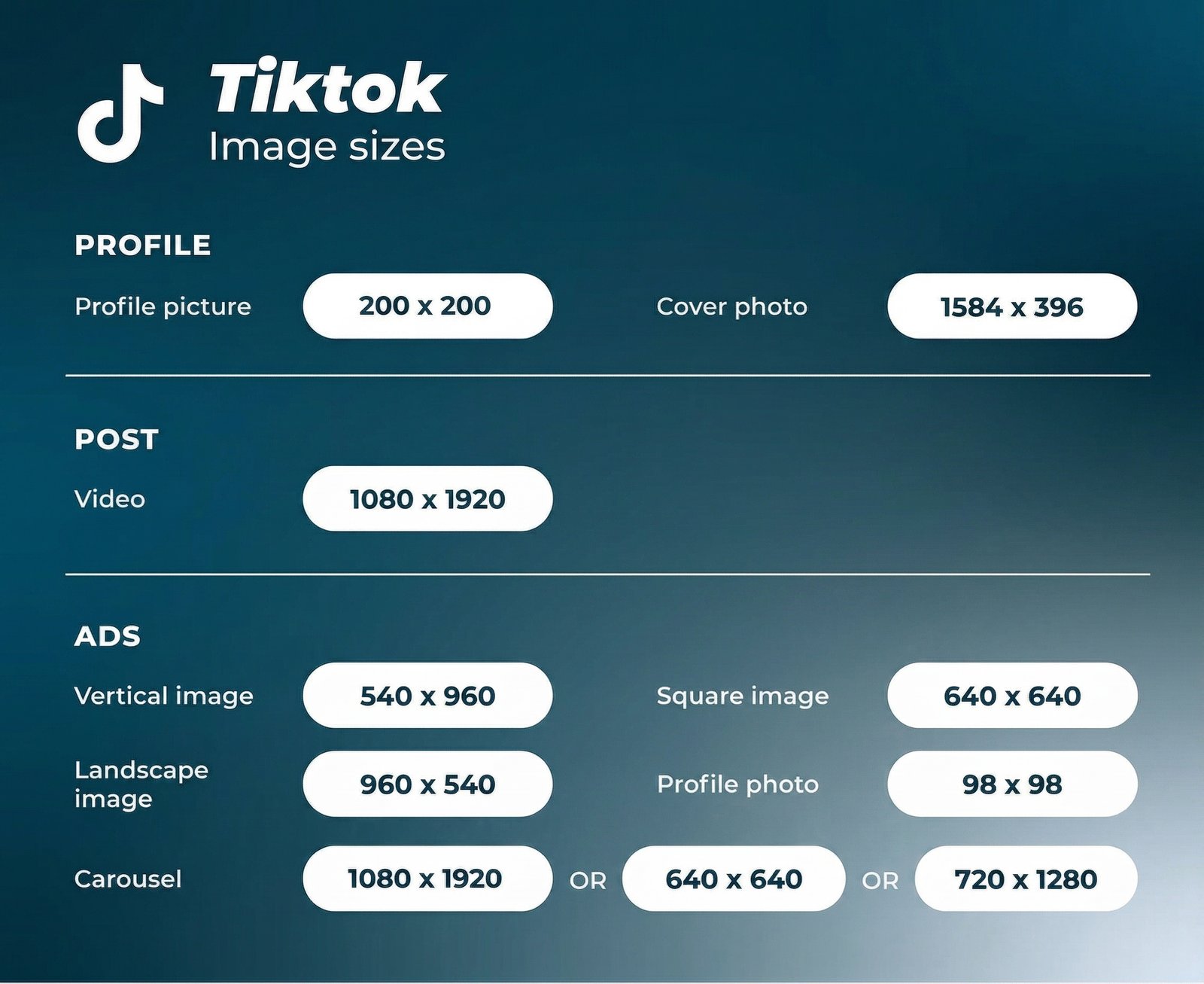
TikTok profile photo size: 200 x 200 pixels (recommended)
အနည်းဆုံး upload တင်နိုင်တဲ့ size ကတော့ 20 x 20 pixels ဖြစ်ပါတယ်။ နောင်ကာလအတွက် ကောင်းမွန်ဆဲဖြစ်ဖို့ (future-proofing) အတွက် ပိုမိုကောင်းမွန်တဲ့ higher quality photo ကို upload တင်ဖို့ အကြံပြုပါတယ်။
TikTok video size: 1080 x 1920 pixels (recommended)
ဒီနည်းလမ်းနဲ့ vertical TikTok videos တွေအတွင်း ကောင်းကောင်းမွန်မွန် aspect ratio ဟာ 9:16 ဖြစ်ပါတယ်။ တကယ် dimensions တွေနဲ့ videos တွေကို တင်ပါက full-screen ဖြစ်သွားမှ platform ဟာ ဘေးပတ်ဝန်းကျင်မှာ black bars တွေ ပြသမှာ ဖြစ်ပါတယ်။
ဒါ social media image sizes 2026 guide တစ်ခုလုံး ဖြစ်ပါတယ်။ Digital Marketing ဆိုတာဘာလဲ ဆိုတဲ့ post ကိုလည်း ဆက်ဖတ်ပြီး digital marketing knowledge ကို ပိုမိုတိုးချဲ့နိုင်ပါတယ်။